If you sell through Facebook groups, some of your best leads show up as plain-text posts: “Anyone know a good realtor in Austin?” or “Looking for a business coach.” Those threads have a short shelf life. Scroll past them and someone else gets the client.
Lead Radar is MaherPost’s feature for catching those buying-intent posts in your groups feed without manually refreshing every community you joined. Here is how it works and who it is for.
What Lead Radar monitors (and what it does not)
Lead Radar scans the aggregated groups feed (MOST_RECENT_GROUPS_FEED). That is the stream Facebook builds from groups you belong to, sorted by recent activity.
It monitors: public posts in that feed that match your keyword rules.
It does not monitor: every group individually on a schedule, private notifications, Messenger, or groups you have muted from the feed.
Understanding this boundary matters. If a group never surfaces in your feed, Lead Radar will not see it either. Stay joined and engaged in communities you care about. Read the Facebook groups feed glossary entry for technical context.
How keyword matching works
You configure buying-intent keywords in MaherPost settings. Examples:
- “looking for a realtor”
- “recommend a plumber”
- “need a business coach”
- “hire a VA”
- “anyone know a good”
Each keyword can run in BROAD or STRICT mode:
- BROAD catches more posts, including partial matches. Higher volume, more noise.
- STRICT requires closer phrasing. Lower volume, higher precision.
Add negative keywords to filter junk: “job posting,” “spam,” competitor names you do not want, etc.
When a post matches, MaherPost scores intent signals: urgency language (“ASAP,” “this week”), budget mentions, recommendation requests, location specificity. High-intent matches rise to the top of your Lead Radar inbox.
Deep dive: Lead Radar buying intent keywords.
Manual review by default
Lead Radar drafts a reply using AI. Nothing sends until you approve. This is intentional.
Auto-reply bots destroy trust in groups. Admins ban them. Prospects feel manipulated. MaherPost keeps you in the loop:
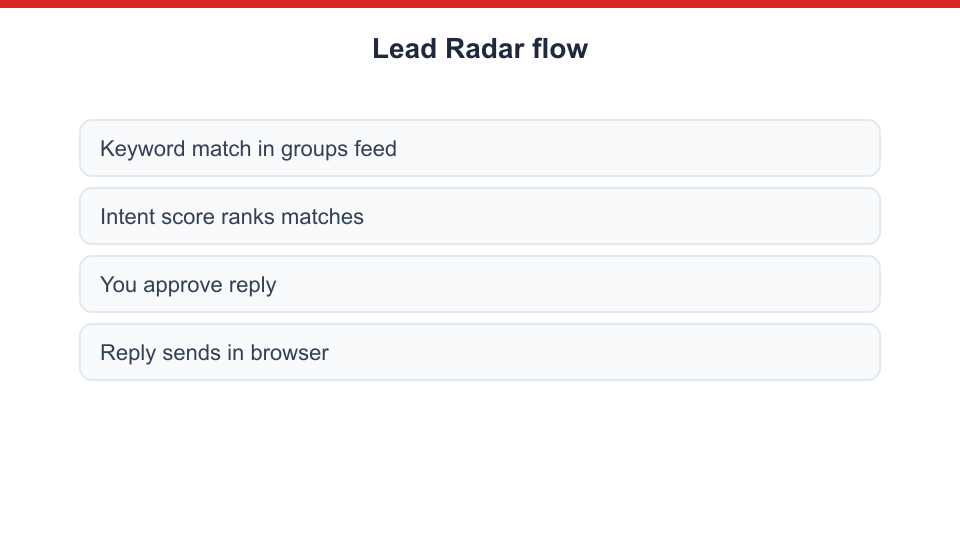
- Match appears in Lead Radar inbox
- You read the original post in context
- AI draft loads (editable)
- You approve, edit, or skip
- Reply posts through your browser session
Optional auto-comment exists with MaherPost with a daily cap. Most operators leave it off and use drafts as a speed boost, not autopilot.
Who uses Lead Radar
Real estate agents watching local buyer and relocation groups. Pair with listing campaigns via real estate niche workflows.
Coaches and consultants catching “need help with” and “looking for mentor” posts. See generate coaching leads use case.
Agencies monitoring niche communities for client verticals. One dashboard, multiple keyword sets per client on white-label plans.
Local service businesses responding to “recommend a contractor” threads before competitors comment.
Recruiters tracking “hiring” and “open to work” language in industry groups.
Lead Radar complements outbound group posting campaigns. Posting builds visibility. Lead Radar captures inbound demand.
Manual scrolling works until you belong to forty groups. You miss posts while in meetings. You check at 11pm when the prospect already hired someone.
Lead Radar centralizes matches with intent scoring. You batch-review twice a day instead of living in the feed. Time saved is real, but the bigger win is speed to reply. First helpful comment often wins the lead in group culture.
Safety and account health
Lead Radar replies go through the same browser-session posting path as campaigns. Rate limits apply. Flooding twenty threads with identical pitch copy in an hour will hurt account health the same way bulk posting would.
Best practices:
- Customize each reply to the post
- Avoid link dumps in first reply unless the group allows it
- Do not reply to unrelated threads just because a keyword matched loosely
- Use STRICT mode when noise overwhelms your inbox
Setup checklist
- Sign up on MaherPost ($29/mo)
- List 10-20 high-intent keyword phrases for your offer
- Add negative keywords for obvious false positives
- Connect Chrome extension and verify groups feed access
- Run in manual approval mode for two weeks
- Tune keywords based on match quality
- Optionally enable capped auto-comment after you trust the drafts
Lead Radar and the rest of MaherPost
Typical operator stack:
- Campaign composer for scheduled outbound posts with spintax
- Lead Radar for inbound intent capture
- Account Health for pre-flight risk on both workflows
- Client reports for showing reply volume to clients
Read features for the full product map. Compare alternatives in MaherPost vs Group Posting PRO, which also offers lead features with different tradeoffs.
Lead Radar is included with MaherPost. Get MaherPost.