


Free tool · No signup
Facebook Group Rules Generator
Pick your group type and a few policies, and this generator writes up to 10 Facebook group rules, each with a title under 50 characters and a short description, plus three membership questions. Copy them straight into your group's rules settings.
Your rules (9 of 10)
- 01
Be kind and respectful
22/50Disagree with ideas, not people. Insults, name-calling and pile-ons are removed, and repeat offenders are removed from the group.
- 02
Stay on topic
13/50This group is for neighbors to share news, ask questions and help each other. Posts that do not fit are declined so the feed stays useful for everyone.
- 03
Promotions on Fridays, in the pinned thread
43/50Members joined for help, not ads. Share your business, offer or link once a week in the Friday thread. Promo posts outside the thread are declined, and repeat posters are removed.
- 04
Links go in the comments
24/50Write the useful part in the post itself and add a link in the comments only if someone wants more. Posts that are just a link are declined.
- 05
Recommendations are welcome, with experience
44/50Ask for and give recommendations freely. When you recommend someone, say what they did for you. Business owners recommending themselves must say so.
- 06
No politics or religion debates
31/50These conversations belong elsewhere. Posts and comment threads that turn political are closed or removed, whatever side they take.
- 07
What is shared here stays here
30/50Do not post other people's private details, addresses, plates or messages. Blur faces and names in screenshots.
- 08
Search before you post
22/50Your question may already have great answers. Use the group search first, and check the pinned posts and guides.
- 09
Admins have the final say
25/50Admins and moderators may decline, edit or remove posts to keep the group useful. Questions about a decision go to an admin by message, not in the feed.
Membership questions for this group
- Q1Which neighborhood or town do you live in?
- Q2What would you like to get out of this group?
- Q3Do you agree to the group rules? (Yes / No)
What makes a group rule work
Members do not read rules the way admins write them. They skim the titles when they join, and they read the description only when a post of theirs is declined. A rule that works is built for both moments.
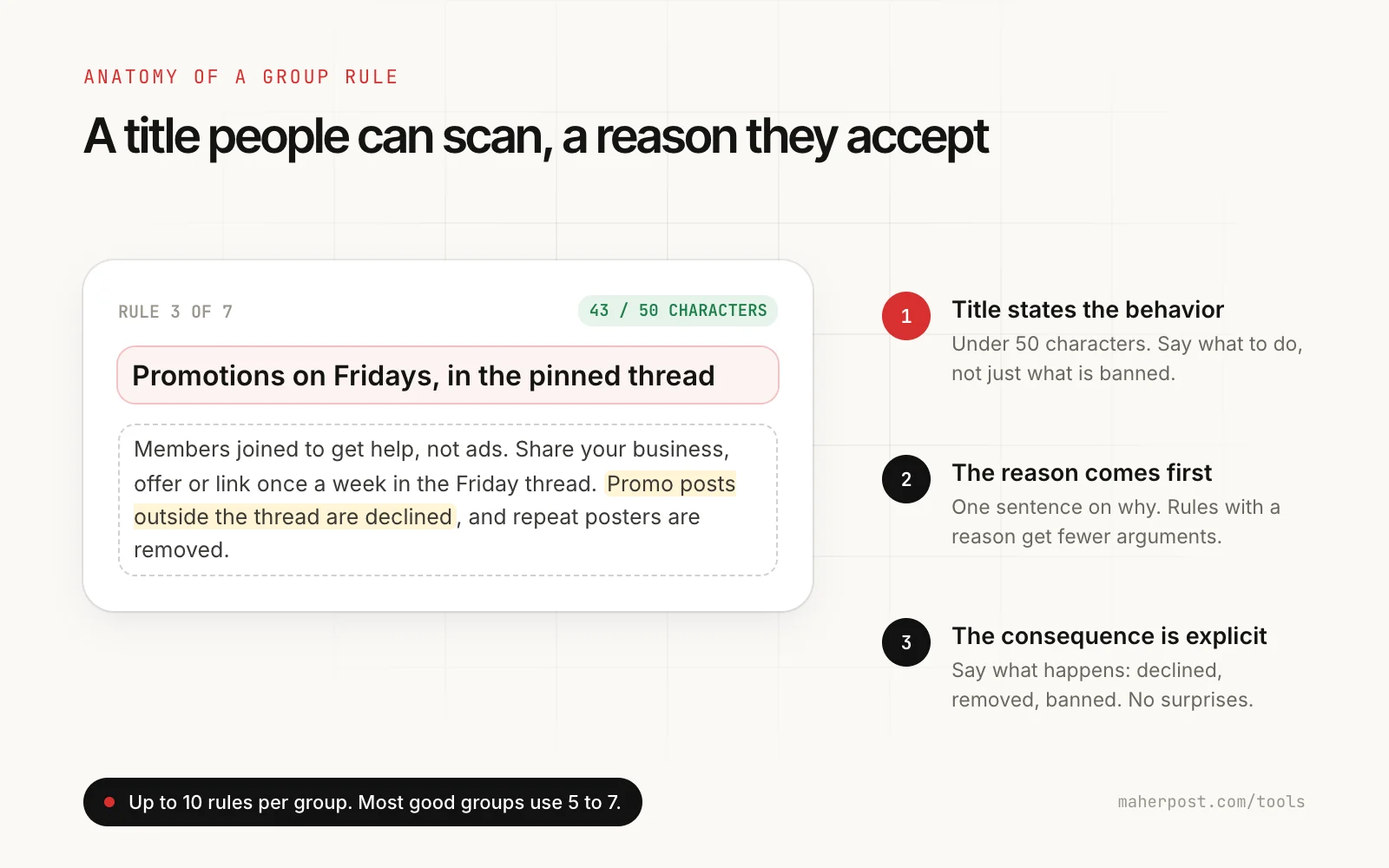
- The title states the behavior. "Promotions on Fridays, in the pinned thread" tells people what to do. "No spam" only tells them what not to do, and everyone thinks their post is not spam.
- The reason comes first. One sentence on why. Rules with a reason get fewer arguments in the comments.
- The consequence is explicit. Declined, removed, or banned after a warning. Members accept a decision they were told about.
- Fewer is better. Facebook allows 10 rules. Five to seven covers almost every group, and every extra rule makes the important ones easier to miss.
Facebook group rules examples by group type
Local community group
- Be kind and respectful. Disagree with ideas, not neighbors. Insults and pile-ons are removed.
- Local topics only. News, questions, events and recommendations for our area.
- Business posts on Fridays only. Local businesses can share offers once a week in the pinned thread.
- Recommendations need experience. Say what someone did for you. Owners recommending themselves must say so.
- Protect people's privacy. No addresses, plates or screenshots with names.
Customer or client group run by a business
- Be kind and respectful. This is a space to learn from each other.
- Ask anything about the topic. No question is too basic. Search first, then ask.
- No selling to other members. Cold DMs and pitches to members get you removed.
- What is shared here stays here. Do not screenshot members' posts outside the group.
- Our team will jump in. Staff answer questions here, but account issues go to support by email.
Professional or industry group
- No cold pitches or ads. Sharing what you do in a relevant answer is fine. Posts that are only a pitch are declined.
- Jobs in the weekly thread. Hiring and looking for work posts go in the pinned Monday thread.
- Links go in the comments. Write the useful part in the post itself.
- Cite your sources. Claims about data, law or regulations need a source.
Buy and sell group
- Price, location and photos in every listing. Listings without them are declined.
- Mark items sold. Edit or delete your post when the item is gone.
- Meet in public, pay in person. Report anyone asking for deposits or gift cards.
- No businesses or resellers. This group is for members selling their own items.
The self-promotion rule, decided
Almost every group argument starts with promotion. There are three workable policies, and the generator above supports all three.
| Policy | Best for | Watch out for |
|---|---|---|
| No promotion at all | Support groups, tight professional groups | Disguised promos and fake "neighbor" recommendations |
| One promo day a week | Local groups, hobby groups, large communities | Promo threads that nobody reads unless admins keep them tidy |
| Allowed if disclosed | Business-run groups, freelancer communities | Members who answer every question with their own service |
If you are on the other side of this, posting your business into groups other people run, our guide to Facebook group rules for promotional posts explains how to read a group's rules before you post, and how to avoid the declines covered in why you can't post in a Facebook group.
How to add rules to your Facebook group
- Open your group and go to Admin tools (on mobile, Manage group).
- Choose Group rules, then Create or Add rule.
- Paste a title and its description from the generator. Repeat for each rule, up to 10.
- Drag the rules into order, most important first, and save.
- Pin a short post pointing new members to the rules, and cite the rule by name when you decline a post.
Setting up the rest of the group
Rules are one part of the setup. The free cover photo size tool makes sure your cover reads well on phones, and the playbook on how to grow a Facebook group covers membership questions, the first 100 members and a weekly posting rhythm. If members ask about posting anonymously, this guide explains how the setting works and what admins can see.
FAQ
Questions people ask before they start
Something else? Email support@maherpost.com and a person replies within one business day.
How many rules can a Facebook group have?
Facebook lets admins add up to 10 rules to a group. Each rule has a short title, kept to about 50 characters, and an optional description. Most well-run groups use 5 to 7 rules, because members read short lists and skim long ones.
What are good rules for a Facebook group?
Good group rules cover respect, staying on topic, self-promotion, links, privacy and the admins' final say, plus anything specific to your group type, such as listing requirements in buy and sell groups. Each rule should state the behavior in the title, give one sentence of reasoning, and say what happens if it is broken.
How do I add rules to my Facebook group?
Open your group, go to Admin tools or Manage group, then Group rules, and choose Create or Add rule. Enter a title and a description for each rule and save. Members see the rules in the About section and when they join, and admins can cite a rule when declining or removing a post.
Should I allow self-promotion in my Facebook group?
Usually in a controlled way. Banning it completely pushes promoters into disguised posts and fake recommendations. A weekly promo thread on a set day, or allowing promotion only when it is disclosed and answers a question, keeps the feed useful while giving members a fair outlet.
What should membership questions ask?
Use your three membership questions to learn who is joining: where they are or what they do, what they want from the group, and agreement to the rules. Business-run groups often add an optional email opt-in with clear consent wording.
Can I edit the rules after I create them?
Yes. Admins can edit, reorder or delete rules at any time from the group rules settings. If you make a big change, post an announcement so members know, and pin it for a week.
Ready when you are
When you are ready to run it on autopilot.
MaherPost schedules spintax posts to every group you have joined, with pacing and a delivery log. $29 a month.